Best Budgeting Apps for Android UK: 7 Rated on Play
The best budgeting apps for Android in the UK, with each app's Google Play rating, who makes it, which has a home screen widget, and Android setup fixes.
Most lists of the best budgeting app for Android in the UK are iPhone lists with the word Android added. That matters more than it sounds. Some popular money apps launch features on iOS first, Android widgets are a different thing from iPhone widgets, and the setup problems Android owners hit (a bank app that will not open during the open banking hand-off, notifications that arrive an hour late) never appear in the round-ups. So we checked every app below on the UK Google Play Store on 2 October 2026: the rating, the developer name, when it was last updated, and what the listing actually promises.
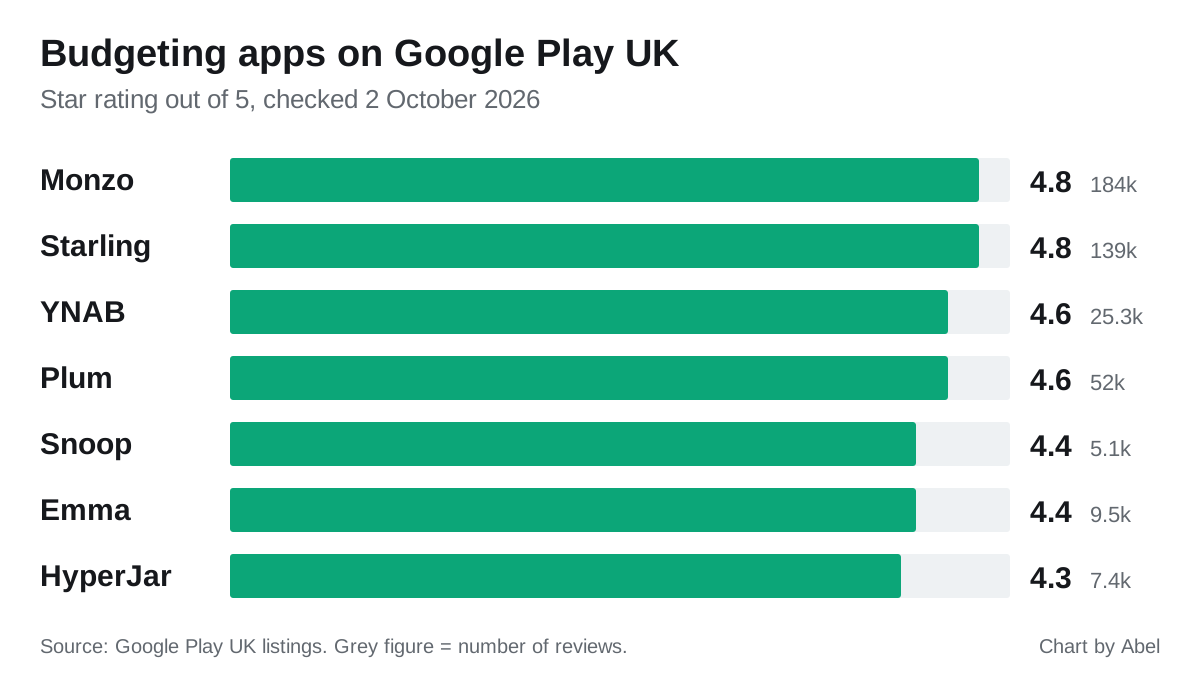
The shortlist, with Google Play ratings
Ratings and review counts move every week, so treat these as a snapshot from the UK Play Store on 2 October 2026.
| App | Play rating | Reviews | Developer shown on Play | Best for |
|---|---|---|---|---|
| Monzo | 4.8 | 184k | Monzo | Budgeting inside a bank account |
| Starling | 4.8 | 139k | Starling Bank | Free in-bank budgeting, no subscription |
| YNAB | 4.6 | 25.3k | ynab.com | Strict zero-based budgets and a real widget |
| Plum | 4.6 | 52k | Plum | Automatic saving rather than tracking |
| Snoop | 4.4 | 5.1k | snoop.app | Free all-accounts overview |
| Emma | 4.4 | 9.5k | Emma Technologies LTD. | Detailed budgets and subscription hunting |
| HyperJar | 4.3 | 7.4k | HyperJar Limited | Envelope-style jars with a prepaid card |
Two things stand out. The banks score highest, partly because millions of people use them for everything and rate them on banking rather than budgeting. And the dedicated budgeting apps sit in a tight band between 4.3 and 4.6, so the star rating alone will not separate them. What separates them is what each one does with your money and how well it suits the way you use your phone.
Monzo: the strongest Android app if you will switch banks
Monzo has the biggest Android following of any UK money app on this list, with more than 10 million downloads on Google Play. Its budgeting tools (Pots, Spending Budgets, Trends and the Salary Sorter, which splits pay into bills, savings and spending as it lands) come free with the current account. Because it is a bank, eligible deposits are FSCS protected.
The limit is that it only budgets money held at Monzo, unless you link outside accounts. If your salary goes into Lloyds and you pay a Barclaycard, you still need an aggregator. Our Monzo review covers the paid plans and what they add.
Starling: free, no tiers to upsell you
Starling has the same 4.8 rating with no paid budgeting tier at all. Spaces work as virtual pots, the Bills Manager pays your direct debits from a ring-fenced Space, and Spending Insights sorts transactions automatically. For an Android user who wants budgeting without a second app or a subscription, it is the cleanest option. We compare the two banks in Monzo vs Starling.
YNAB: the only one here with a documented Android widget
If a home screen widget is the reason you are reading this, YNAB is the answer. Its help page on mobile widgets confirms an Android widget that shows your chosen budget categories and lets you add a transaction without opening the app. It needs Android 7 or newer. The small size shows one category; the large size is a scrollable list of as many as you like.
The other apps here do not advertise a home screen balance widget in their UK Play Store listings. Monzo’s own community forum has a long run of Android widget requests going back years. If at-a-glance numbers matter, check the current listing before you commit, because this is the kind of feature that can arrive in any update.
YNAB is a paid subscription with a free trial, priced in US dollars, and UK bank import is less complete than on the homegrown apps. You are paying for the method: every pound gets a job before you spend it.
Plum: rated well, but it is a saving app
Plum’s 4.6 rating comes from 52,000 reviews, more than Snoop and Emma put together. Most of that goodwill is about its automatic saving, which skims small amounts based on your spending. As a budget tracker it is thinner than Snoop or Emma. Pick it if your problem is saving nothing, not knowing where the money goes. Read is Plum safe before you move large sums, because cash and investments are protected in different ways.
Snoop: best free all-accounts view on Android
Snoop is the free aggregator we would install first. It pulls every bank and card into one screen over open banking, sorts spending, and flags renewals and cheaper deals from your real bills. The free tier is genuinely usable; Snoop Plus adds custom categories and alerts. Full detail is in our Snoop review.
Check the developer before you install. The genuine listing shows “snoop.app” as the developer, with package name app.snoop in the web address.
Emma: best for detailed budgets, but watch the two-account cap
Emma is the more detailed of the two aggregators, with strong subscription tracking, but the free tier links only two accounts, which most households pass straight away. The Play listing was last updated on 26 September 2026, so it is actively maintained on Android. See our Emma app review for what each paid tier unlocks.
HyperJar: jars you can spend from with Google Pay
HyperJar splits your money into Jars and lets you spend straight from them on a prepaid card, which suits anyone who budgets better with hard limits than with charts. It supports Google Pay, so the Jar system works with a tap of your phone. HyperJar is e-money: your balance is safeguarded but not FSCS protected, so keep it as spending money rather than savings.
Android setup problems the round-ups miss
The bank app does not open when you connect an account. Open banking on Android usually hands you from the budgeting app to your bank’s app to approve access. If your phone opens the bank’s website instead and asks you to log in from scratch, Android is not routing the link to the app. Go to Settings, Apps, your bank’s app, Open by default, and make sure “Open supported links” is switched on. Then try the connection again. If accounts still drop, our page on when a bank won’t connect to a budgeting app goes through the 90-day reconsent and the other common causes.
Spending alerts arrive late or not at all. Android’s battery saving can hold back notifications from apps it thinks you rarely open. In Settings, Apps, the budgeting app, Battery, set it to Unrestricted (the wording varies by phone maker; Samsung calls the list “Never sleeping apps”). This matters most for in-bank budgeting, where the instant payment alert is half the point.
Copycat apps. Fake finance apps do get onto app stores. Only install from Google Play, and check the developer name against the table above before you enter anything. A real budgeting app never asks for your online banking password; it sends you to your bank to approve read-only access. The Open Banking explainer on why it is safe sets out exactly what an app can and cannot see. Our guide to fake banking app scams shows the warning signs.
Which one should you install?
- You want one free app that shows every account: Snoop.
- You want detailed budgets and will pay for more than two accounts: Emma.
- You are happy to move your main account: Starling for free and simple, Monzo for the richest features.
- You want your budget on the home screen: YNAB.
- You overspend unless the money is physically walled off: HyperJar.
For the full comparison across platforms, including the apps that have closed, see our best budgeting apps in the UK and the best free budgeting apps.
Frequently asked questions
Is there a good free budgeting app for Android in the UK? Yes. Snoop’s free tier covers all your accounts over open banking with automatic categorisation, and Starling’s in-bank budgeting is free with no paid tier at all.
Do UK budgeting apps work the same on Android as on iPhone? The core features are the same, but widgets and some new features can differ by platform. Check the Google Play listing, not the App Store page or a review written about the iPhone version.
Which UK budgeting app has an Android home screen widget? YNAB documents an Android widget for budget categories and quick transaction entry, on Android 7 or newer. The other apps on this list do not advertise a balance widget in their UK Play Store listings.
Why does my bank’s website open instead of the app when I link an account? Android is not set to open your bank’s links in its app. Turn on “Open supported links” under Settings, Apps, your bank’s app, Open by default.
Is it safe to connect my bank to a budgeting app on Android? It is if the app uses open banking and is FCA authorised or registered. You approve access inside your own bank’s app, the access is read-only, and you can withdraw it from your bank’s app at any time.
How can I tell a fake budgeting app on Google Play? Check the developer name and the download count, and be wary of any app that asks you to type in your online banking login. Genuine apps never ask for it.