Snoop vs Emma: Which Actually Finds Your Subscriptions?
Snoop vs Emma for subscriptions: Emma's free plan caps you at 2 bank logins, Snoop's does not. Which one really spots the payments you forgot?
Most people comparing Snoop vs Emma want the answer to one narrow question: which app will actually surface the £8.99 that has been leaving my account every month since 2023? Both apps detect recurring payments, both put them in a dedicated screen, and neither will cancel anything for you. The difference that decides it is not the detection engine. It is how many bank connections each app lets you have before it asks for money, because a subscription sitting on the credit card you did not connect is a subscription neither app can find.
The short answer
Use Snoop if the wasted spend is spread across several banks and cards. Its free tier does not publish a bank-login cap, so you can connect the old current account, the joint account and the credit card you only use for online sign-ups. Subscription and regular-payment tracking sits on the free plan.
Use Emma if everything runs through one or two accounts and you want the tidier interface. Emma’s recurring-payments screen is the better-built one, and it adds price-hike alerts. But Emma’s free plan allows only two bank logins, so a third connection costs money.
The bank-login limit is the whole game
Emma changed its plan limits in April 2023 and has kept them since. The free plan gets 2 bank logins, Plus gets 4, and Pro and Ultimate are unconnected. Emma’s own community post from its team is the source, and it is worth reading the definition carefully: a “bank login” is one connection, and one connection can carry several accounts. If you bank with Lloyds and hold a current account, a savings account and a Lloyds credit card under the same login, that is one of your two.
Where it bites is the pattern that creates forgotten subscriptions in the first place. Free trials get signed up for on a card you barely look at. That card is usually with a different provider, which means a separate login. Two logins covers a main current account and one card. It does not cover a main account, a partner’s account, an Amex and a dormant Halifax account from university.
Snoop does not publish an equivalent cap on its free plan, and regular payment and subscription tracking is listed on both its free and Plus tiers. Our Snoop app review notes that some third-party sites claim a three-account limit on the free tier; we could not confirm that on Snoop’s own pages, so treat it as unverified and test it in-app if you plan to connect many accounts.
What each app actually does with a subscription once it finds it
Neither app cancels anything. This is the single most common misreading of both products, and it is worth being blunt about because the marketing language (“cancel what you don’t need in a few taps”) reads like a concierge service and is not one.
| Snoop | Emma | |
|---|---|---|
| Detects recurring payments | Yes, free tier | Yes, free tier |
| Separates subscriptions from day-to-day spend | Yes | Yes, dedicated screen |
| Price-increase alerts | Bill tracking and contract renewal notices | Real-time alerts when a subscription price rises |
| Weekly bill reminders | Yes | Upcoming payments view |
| Cancels on your behalf | No | No |
| What “cancel” actually means | You act on the alert yourself | Emma links you to that provider’s cancellation route |
| Bank logins on the free plan | No published cap | 2 |
| Track bills by pay cycle | Snoop Plus only | Emma’s committed-spend view |
Emma’s cancellation flow gives you the provider’s instructions and sends you there. Emma’s own guidance on cancelling subscriptions tells you to find the “Cancel Subscription” or account settings section on the provider’s site, or to contact their support if that fails. That is genuinely useful, because the hard part of cancelling a gym membership is usually finding the route, not deciding to do it. It is not automation.
Snoop’s angle is different and worth understanding on its own terms. Snoop was built around cutting your bills rather than cataloguing them, so alongside subscription detection it pushes cheaper energy, broadband, mobile and insurance deals. Those switches earn Snoop commission. That does not make the prompts wrong, but it explains why Snoop nudges you toward switching a contract where Emma nudges you toward cancelling one.
What each costs when the free tier runs out
Prices as published by each company, checked August 2026. Both change these, so check the live pages before you commit.
| Plan | Monthly | Annual |
|---|---|---|
| Snoop Plus | £5.99 | £47.99 |
| Emma Plus | £4.99 | £41.99 |
| Emma Pro | £9.99 | £83.99 |
| Emma Ultimate | £14.99 | £124.99 |
Emma’s annual pricing works out at a 30% discount on monthly across all three tiers, per Emma’s own pricing article. Snoop publishes its split on the Snoop Plus page.
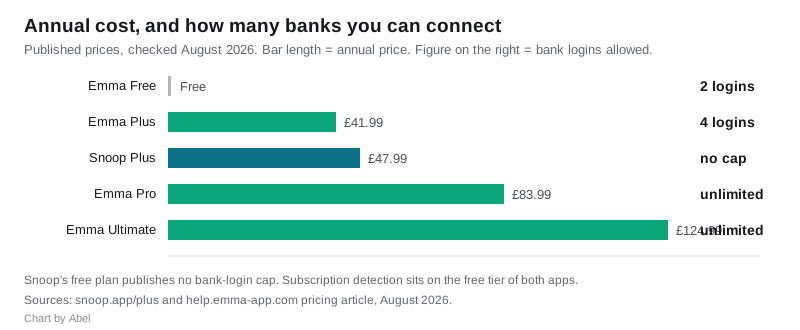
Read those numbers against what you are hunting. If you are chasing one forgotten £9.99 streaming subscription, paying £4.99 a month to find it is not a saving. The paid tiers earn their keep on ongoing account aggregation and analysis, not on a one-off subscription audit. Do the audit on the free tier, cancel what you find, then decide whether the app is worth paying for.
The subscriptions both apps routinely miss
This is where the “which app is better” framing falls apart, because both share the same blind spots and neither warns you about them clearly:
- Anything billed through an app store. If you subscribed inside an iPhone app, the payment often reaches your bank as one lumped Apple charge covering several services. Both apps see “Apple” and a total. Neither can break it down. Check Settings, your name, Subscriptions on iOS, or Payments and subscriptions in the Google Play app, separately.
- Annual renewals. A recurring-payment detector needs to see a pattern. A subscription that charges once every twelve months may not be classified as recurring until its second or third charge, by which point you have paid for two or three years. Scroll a full 13 months of statements by hand once, whatever the app tells you.
- Payments on an unconnected card. Obvious, and still the number one cause. This is why the login limit matters more than the feature list.
- Charges under a trading name you do not recognise. Both apps show the merchant string your bank passes through. If it reads as an obscure limited company, search the exact string before assuming it is fraud.
- Continuous payment authorities you thought were direct debits. A CPA sits on your debit or credit card, not in your bank’s direct debit list, so cancelling it at the bank works differently. You can withdraw consent with your card provider, and they must stop it.
Our guide to finding and cancelling forgotten subscriptions works through the manual sweep that catches the ones no app will.
How to run the audit properly, with either app
- Connect every account that has ever had a card attached to it, including the dormant ones. On Emma’s free plan you get two logins, so if you have more than two providers either rotate them one at a time or start with Snoop.
- Open the recurring payments screen and sort by amount, then by date last seen. The expensive ones are obvious. The ones you have forgotten are usually small and old.
- Check the app store subscription lists separately on iOS and Android. Neither app can do this for you.
- Scroll 13 months of statements manually to catch annual renewals the pattern detector has not classified yet.
- Cancel with the provider, not with the app, and take a screenshot of the confirmation. Then check the following month that the payment actually stopped.
- If a payment continues after you cancelled it, contact your bank or card provider to withdraw the payment authority. You are entitled to do this, and the provider’s refusal to cancel is not the end of it.
If you want to see what the total is before you start, our subscription cost calculator totals up the annual figure, which is usually the number that makes people act.
So which one
For the specific job of spotting wasted spend, Snoop on its free tier is the better starting point, purely because it lets you connect everything without paying. The point of a subscription audit is completeness, and an app that can only see two-thirds of your money produces a comfortable, wrong answer.
Emma is the better product if you are picking a budgeting app to live in long term and your finances are consolidated. The recurring payments screen is cleaner, the price-hike alerts are a real feature rather than a rebadged bill reminder, and the committed-spend view is a more honest way to look at a monthly budget than a category pie chart.
The most sensible route, and the one almost nobody takes: use Snoop’s free tier for the one-off audit, cancel what it finds, then choose your permanent app on the things you will use every week. Our Emma app review and the three-way Emma vs Snoop vs Plum comparison cover that longer-term decision, and the best subscription tracker apps in the UK looks at the dedicated tools that do nothing else.
Frequently asked questions
Does Snoop or Emma cancel subscriptions for you? Neither does. Both detect recurring payments and flag them, and Emma will point you to the provider’s cancellation route, but you complete the cancellation yourself with the company taking the money. Any review implying one-tap cancellation is describing the flagging step, not an actual cancellation.
Can I find subscriptions with the free version of either app? Yes. Subscription and recurring-payment detection is on the free tier of both Snoop and Emma. The limitation on Emma’s free plan is the number of bank logins, capped at two, rather than the feature itself.
How many accounts can I connect to Emma for free? Two bank logins on the free plan and four on Emma Plus, with Pro and Ultimate unrestricted. One login can carry several accounts held with the same provider, so a current account, savings account and credit card with one bank count as a single login.
Why can’t either app see my Apple or Google subscriptions individually? Because your bank receives them as a single combined charge from Apple or Google rather than as separate merchant payments. The apps can only read what the bank passes through. Check your subscriptions inside iOS Settings or the Google Play app to see the breakdown.
Are Snoop and Emma safe to connect to my bank? Both use Open Banking, which is read-only: they can see transactions but cannot move money, and you log in through your own bank rather than giving the app your banking password. Both operating companies are regulated by the FCA, and you can confirm any provider’s status yourself on the FCA Financial Services Register before connecting.
Will cancelling a subscription in the app stop the payment? No, and this is the failure that costs people money. Marking something as cancelled inside a budgeting app changes how the app displays it, nothing more. The payment stops only when the provider stops taking it, or when you withdraw the payment authority through your bank or card issuer.