Emma Subscription Tracker Tested: Does It Catch Everything?
The Emma subscription tracker misses Apple, PayPal and annual renewals, and it cannot cancel anything. What it catches, and how to plug the gaps.
The Emma subscription tracker is the feature most people download the app for: connect your bank, and a list of every recurring payment appears without you having to trawl a year of statements. It does that job well for the payments it can see. The interesting question is the one the marketing never answers, which is what it cannot see, because a subscription tracker that misses four of your twelve subscriptions is worse than useless. It gives you the feeling of having checked.
This page goes through what Emma detects reliably, the four categories of recurring payment it structurally cannot detect, and what to do about each one.
Where the tracker lives and who gets it
Emma calls the feature Recurring payments, not Subscriptions. You reach it by scrolling down the Feed, the app’s main dashboard, to the Recurring payments card, then tapping through to the full list. Each entry shows the payment history for that merchant, so you can see when a price went up.
Two limits shape everything below. First, Emma’s own help centre states that checking your recurring subscriptions is a feature for Emma Plus, Pro and Ultimate users, so on the free tier the detection engine is not the product you are testing. Second, the free plan allows two bank logins. A subscription running on the credit card you did not connect is invisible to any Open Banking app, Emma included, and no amount of clever pattern-matching changes that. If you are weighing the tiers, our Emma app review covers what each one includes, and Snoop vs Emma covers the login cap specifically.
What it catches well
Emma is strong on the payments that look like textbook subscriptions from the bank’s side:
- Fixed monthly card payments with a stable merchant string. Streaming, gyms, software tools, mobile add-ons. These are detected within a couple of cycles.
- Direct debits and standing orders. These carry an explicit mandate reference in the Open Banking data, so there is nothing to infer.
- Variable-amount recurring bills. Energy, water and phone bills that change month to month still get grouped, and Emma lets you amend the expected minimum and maximum so a normal fluctuation does not read as a price rise.
- Price increases. This is the genuinely useful part. Because each entry keeps its payment history, a provider quietly moving you up a tier shows as a step in the list rather than disappearing into a month you did not check.
The four things it misses
1. Anything grouped under apple.com/bill
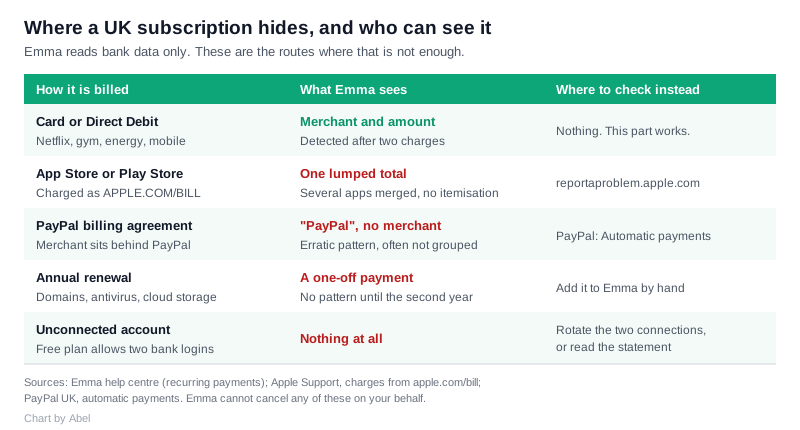
Apple batches purchases. Several App Store subscriptions bought on different days can arrive at your bank as a single APPLE.COM/BILL line, and Apple’s own billing support says purchases may be grouped into one charge, with no separate email receipt for each item. To Emma, that is one merchant taking one variable amount, so a five-app habit reads as a single mystery subscription that changes size every month.
Google Play behaves the same way for Play Store subscriptions.
The fix: sign in at reportaproblem.apple.com to see the itemised list behind each combined charge, then cancel the individual subscriptions in iPhone Settings under your Apple Account. Apple’s page on charges from apple.com/bill walks through it. Emma cannot itemise this for you and never will, because the detail is not in the banking data.
2. Anything paid through PayPal
A PayPal billing agreement puts PayPal between you and the merchant, so what reaches your bank says PayPal. The merchant name is not in the transaction. If you have three billing agreements set up over the years, Emma sees one merchant with an erratic payment pattern, and pattern-matching on an erratic merchant is exactly what a recurring-payment engine is bad at.
The fix: open PayPal on the web, go to Settings, then Payments, then Automatic payments. Every live billing agreement is listed there with the merchant named, and you cancel from that screen. PayPal’s own note on automatic payments confirms that a payment not listed there may be a direct card charge instead, in which case it is back to your statement. Nothing in Emma reaches into a PayPal account, so audit that list by hand once a year.
3. Annual renewals
An annual subscription is, from a detection engine’s point of view, a single payment. It only becomes a pattern on the second charge, twelve months later. Whether Emma has twelve months of history to work with depends on how much your bank hands over on connection, and how long ago you connected.
Annual renewals are also where the money hides, because the whole point of the annual plan is that you do not think about it monthly. Domain names, antivirus, insurance add-ons, cloud storage and password managers all live here.
The fix: Emma lets you add a recurring payment manually. Go to Feed, Recurring payments, See all, and enter the merchant, amount and frequency yourself. Do that for every annual renewal you know about, and the app will at least warn you before the next one lands.
4. Renamed merchants, which become duplicates
When a merchant changes its payment descriptor, or you replace a lost card, Emma can fail to associate the new payment with the existing record. The result is a duplicate: one entry marked inactive, one new entry, and a total committed-spend figure that is wrong. Emma’s help centre acknowledges this and documents the fix.
The fix: open the duplicate, use the three-dot menu, and delete the entry that is no longer active. Do a pass on the whole list quarterly rather than trusting the headline number.
The cancellation claim, tested
Emma’s marketing page for recurring payments says you can cancel what you do not need in a few taps. Its help centre says something different: if there are subscriptions you no longer want, you should reach out to your bank to cancel the Direct Debit, or go to the subscription provider to cancel.
The help centre is the accurate one. Emma is an account information service. It reads your accounts, it does not move money in them, and it holds no authority to instruct a merchant on your behalf. The “few taps” are the taps that take you to the cancellation route, not a cancellation. No UK budgeting app currently cancels a card subscription for you, which is worth knowing before you pay for one on that basis.
The practical consequence is that a subscription audit is a two-tool job. Emma finds the payment. You cancel it at the merchant, or by withdrawing the continuous payment authority with your bank, which your bank must action on request even if the merchant objects.
Why your accounts go quiet after three months
If the tracker suddenly stops updating, it is usually consent expiry rather than a bug. Under the FCA’s PS21/19 changes, banks no longer force you to re-authenticate every ninety days. Instead the app itself has to get you to reconfirm consent every ninety days, a change Open Banking Ltd summarised here. The upside is that reconfirming is a tap rather than a full bank login. The downside is that it is easy to dismiss the prompt, and a disconnected account is a silent hole in your subscription list, not an error message. There is more on how this plumbing works in our guide to budgeting apps and Open Banking.
How to run an audit that actually finds everything
- Connect every account that has ever had a card attached to it, including the dormant one. On the free tier you get two, so rotate them: connect two, read the list, swap.
- Read the Recurring payments list, then delete the duplicates and inactive entries so the total means something.
- Open reportaproblem.apple.com and the Google Play subscriptions page separately. Anything you find there will not be itemised in Emma.
- Open PayPal’s Automatic payments screen separately.
- Add every annual renewal you found in steps 3 and 4 back into Emma manually, so next year the app warns you.
- Cancel at the merchant, not in Emma.
Steps 3 and 4 are the ones people skip, and they are where the forgotten money usually is.
Frequently asked questions
Is the Emma subscription tracker free? No. Emma’s help centre lists checking your recurring subscriptions under Emma Plus, Pro and Ultimate. The free tier also caps you at two connected bank logins, which limits what any tracker could see.
Can Emma cancel a subscription for me? No. Emma reads your accounts under Open Banking and cannot instruct a merchant. Its own help centre tells you to contact the provider, or your bank for a Direct Debit. Treat any “cancel in a few taps” wording as a link to the cancellation route.
Why does Emma show one big Apple payment instead of my individual apps? Because Apple groups purchases into a single apple.com/bill charge, sometimes covering items bought on different days. Only the total reaches your bank, so no Open Banking app can break it down. Use reportaproblem.apple.com for the itemised view.
Does Emma find subscriptions paid through PayPal? Not by merchant. The transaction that reaches your bank names PayPal, not the company behind the billing agreement. Check PayPal’s Automatic payments screen directly.
How long does Emma need before it spots a subscription? Two charges. Monthly subscriptions usually appear within a couple of cycles. Annual ones may not appear at all unless your bank has supplied enough history, which is why adding them manually is worth the five minutes.
Why did my recurring payments stop updating? Most often because the ninety-day consent reconfirmation lapsed. Since the FCA’s rule change, the app has to ask you to reconfirm rather than the bank forcing a re-login, and dismissing that prompt quietly disconnects the account.
Is a duplicate entry a bug? Not exactly. It happens when a merchant’s payment descriptor changes or you get a new card, and Emma cannot link the new payment to the old record. Delete the inactive one from the three-dot menu.