How to Close a Monzo Account: 4 Steps, 10-Year Data Rule
How to close a Monzo account: empty pots, cancel paid plans, hit £0, tap Close. Plus Starling and Revolut, and why your data is kept for years after.
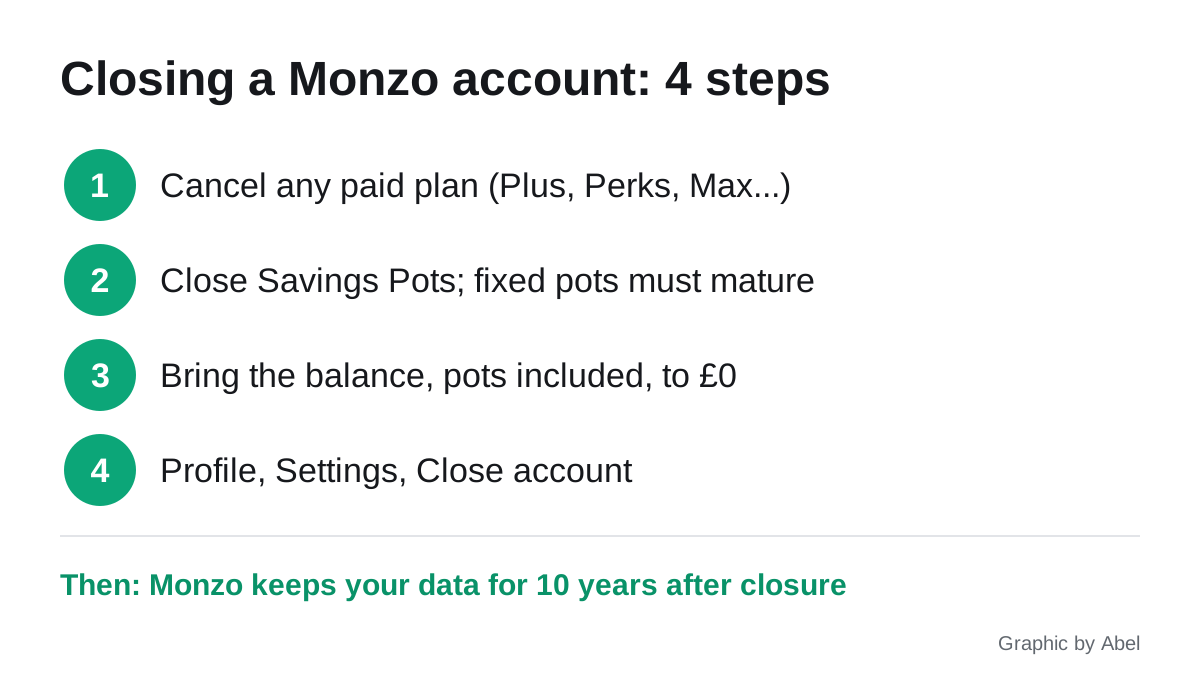
If you want to know how to close a Monzo account, the short version is: cancel any paid plan, empty and close your savings pots, bring the balance to exactly £0, then tap Close account in your profile settings. The longer version matters more, because closing an app account does not erase you from the bank’s records, and simply deleting the app closes nothing at all.
This page covers Monzo step by step, the equivalent steps at Starling and Revolut, the difference between closing and leaving an account dormant, and what a data deletion request can and cannot do afterwards.
Closing vs deleting the app vs leaving it dormant
| What you do | Is the account closed? | What happens to the money | What happens to your data |
|---|---|---|---|
| Delete the app from your phone | No | Stays in the account | Nothing changes |
| Leave the account unused | No | Stays yours; after 15 years of no activity it can move to the Reclaim Fund, and you can still claim it back | Kept while the account is open |
| Close the account in the app | Yes | You must move it out first | Kept for a set period, then deleted |
| Close, then ask for erasure | Yes | Already moved out | Some data deleted; regulated records kept |
Deleting the app is the trap. Direct Debits keep running, card subscriptions keep charging, and any overdraft keeps accruing. If you are done with an app, close the account properly.
How to close a Monzo account, step by step
These are Monzo’s own steps from its help page on closing your account, checked 4 October 2026.
- Cancel any paid plan first. Monzo says you need to cancel a Plus, Premium, Extra, Perks or Max subscription before the account can close. Do this in the app’s settings.
- Close your savings pots. Close each Savings Pot and wait for the money to land in your main balance. Monzo says this is usually the next working day, and any interest owed is typically paid on the second working day of the month, so you may need to wait for that too.
- Fixed rate pots are locked. If you have a fixed term pot, you cannot close the account until it matures. The exception: if you leave through the Current Account Switching Service (CASS), the money is sent to your new account when the pot matures.
- Bring the balance to £0. That includes every pot. Move the money to another account in your own name.
- Tap Close account. It sits under your profile, then Settings, then Close account.
Before step 5, check your email address and phone number are current. Monzo emails a password-protected PDF statement of your full transaction history after closure and texts the password separately. Save that PDF somewhere safe: once the account is closed, you cannot log in to download statements yourself, and you may need them for a mortgage application or a tax return.
If you change your mind, Monzo says you must wait at least 30 days from closure to reopen, and reopening is not guaranteed.
Moving a Cash ISA out first
If you hold Cash ISA pots and want to keep the tax wrapper, transfer them to another provider through the new provider’s ISA transfer process before closing. Withdrawing the cash yourself loses the ISA status of that money. Monzo notes that interest may be delayed during a transfer and can be paid to your current account instead. Our best Cash ISA apps page lists alternatives.
Use CASS if you are moving banks
If you are closing Monzo because you are moving your main account, the Current Account Switching Service closes the old account for you, moves your Direct Debits and standing orders, and redirects payments sent to the old account. That is usually tidier than closing manually.
How to close a Starling or Revolut account
Starling. Move your balance out and cancel standing orders and Direct Debits, then in the app open your account icon, find the account you want to close, tap the three dots next to it and choose Close Account. Starling’s 24/7 line is 0800 0234 617 if you get stuck. Starling usually asks you to wait 12 months before reapplying, a longer gap than Monzo’s 30 days.
Revolut. Revolut’s closing account help requires every account, Pocket and currency balance to be at zero, with no pending transactions. You also need to downgrade to the Standard plan, close any investment account, and end any Revolut insurance or Kids and Teens accounts. Then tap your profile, Account, Close account. Revolut says most closures are instant.
A common snag with both: a single pending card payment or a few pence left in a foreign currency balance blocks closure. Spend or exchange the odd amounts first.
Cut off everything that pays from the account
Closing the account stops new payments, but merchants will not be told. Before you close:
- Move Direct Debits to your new account, or cancel them with the company.
- Update card details with every subscription. A closed card will fail, and some services treat a failed payment as a missed one.
- Cancel continuous payment authorities. These are recurring card payments, which you can stop through your bank or the merchant; see our page on cancelling a CPA.
- Revoke open banking links. If budgeting or credit apps are connected to the account, revoke their access from both sides. Closing the bank account ends the feed, but the third-party app may still hold the data it already collected. Our guide to revoking open banking access shows where the switches are.
- Delete the third-party apps’ accounts too. A budgeting app holds its own copy of your transactions. Closing the bank account does not delete them.
What the bank keeps after you close
This is the part most people get wrong. A UK bank cannot wipe your records on request, because the law requires it to keep them.
Under the Money Laundering Regulations 2017, firms must keep customer identity records and transaction records for at least five years after the business relationship ends. Banks also keep records for longer periods in case of legal claims. Monzo’s privacy notice says it keeps your information for 10 years after the account closes “in case we need to respond to a legal claim”, and longer in fraud or money laundering cases.
Your credit file is separate. Current accounts are reported to credit reference agencies, and Experian’s UK retention schedule keeps account data for six years for lending decisions. A closed account in good standing shows as closed rather than vanishing, which is normally harmless or mildly helpful. If you want to see what lenders see, a free credit score app will show the closed account.
Asking for your data to be deleted
You still have a right to ask for erasure under UK GDPR. Monzo says to email help@monzo.com or call 0800 088 4040 after closing. What to expect:
- The firm has one calendar month to respond, extendable by up to two more months if it tells you why within the first month.
- It is usually free. A fee is only allowed for requests that are manifestly unfounded or excessive.
- Regulated records stay. The ICO’s guidance confirms the right does not apply where a firm has a legal obligation to keep data, such as financial regulation. Expect marketing data, app analytics and optional profile data to go, and identity and transaction records to stay until their retention period runs out.
- Put it in writing. The ICO recommends a written request because it gives you a record if you need to complain.
If the reply does not satisfy you, complain to the firm first, then to the ICO. A sensible request is: “Please delete all personal data you are not legally required to retain, stop all marketing, and confirm which categories you are keeping, why, and until when.”
Frequently asked questions
Can I close my Monzo account with money in it? No. Monzo requires the balance, including every pot, to be exactly £0 before the Close account button works. A fixed rate pot must mature first unless you switch through CASS.
Does deleting the Monzo app close my account? No. Deleting the app leaves the account open, with any Direct Debits, card subscriptions and overdraft still active. Close the account in the app first.
Can I reopen a closed Monzo account? Monzo says you must wait at least 30 days after closure and that reopening is not guaranteed. Starling usually asks you to wait 12 months before reapplying.
Will closing a bank account hurt my credit score? Closing a current account in good standing rarely has much effect. The closed account stays visible on your file, and an arranged overdraft must be repaid before you can close.
Can a bank refuse to delete my data? Yes, for records it is legally required to keep. Money laundering rules require at least five years after the relationship ends, and Monzo keeps data for 10 years in case of legal claims.
What happens to money in an account I forgot about? It stays yours. After 15 years with no activity, banks can transfer it to the Reclaim Fund, but you can claim it back from your bank at any time.
Sources
- Monzo, Closing your account, checked 4 October 2026
- Monzo, Privacy notice, retention section
- Revolut, Closing your account
- ICO, Your right to get your data deleted
- Experian, Credit reference data retention periods